
Don’t Buy the Insta360 Luna Ultra Until You Know These Strengths and Limitations
Don’t Buy the Insta360 Luna Ultra Until You Know These Strengths and Limitations
I’ve been using the Insta360 Luna Ultra for the past few months, and it has become the camera I reach for to create about 90% of my content. The image quality is excellent, the dual lenses give me a lot of flexibility, and the detachable touchscreen makes filming by myself much easier.
But it is not perfect, and it is definitely not an action camera. Before buying one, it’s worth understanding what it does well, which accessories actually help, and the limitations that could affect the way you create.
Quick Summary
- The detachable touchscreen and subject tracking make the Luna Ultra especially useful for solo creators.
- Dual lenses provide wide shots, distant framing, and surprisingly good macro-style close-ups.
- My 4K 60 fps battery test delivered just under two and a half hours of recording.
- The main limitations are no 4:3 recording, wide-angle attachment compromises, and no waterproofing.
Table of Contents
- Dual Lenses Give You More Ways to Get the Shot
- Low-Light Performance and Stage Mode
- Audio Matters Just as Much as Video
- A Mechanical Gimbal That Stabilizes and Tracks
- The Detachable Touchscreen Is My Favorite Feature
- 360 Photos, Panoramas, and Creative Recording Modes
- Battery Life and Charging: My Actual Results
- 47 GB of Internal Storage Is a Welcome Backup
- Accessories Worth Knowing About
- Standard Bundle or Creator Bundle?
- The Things I Wish Were Better
- Who Should Buy the Luna Ultra?
Dual Lenses Give You More Ways to Get the Shot
The Luna Ultra’s dual-lens system is one of its biggest attractions. You get a wide-angle lens and a telephoto lens on the same gimbal camera, so you can capture the scene around you and then get closer to a subject without changing cameras.
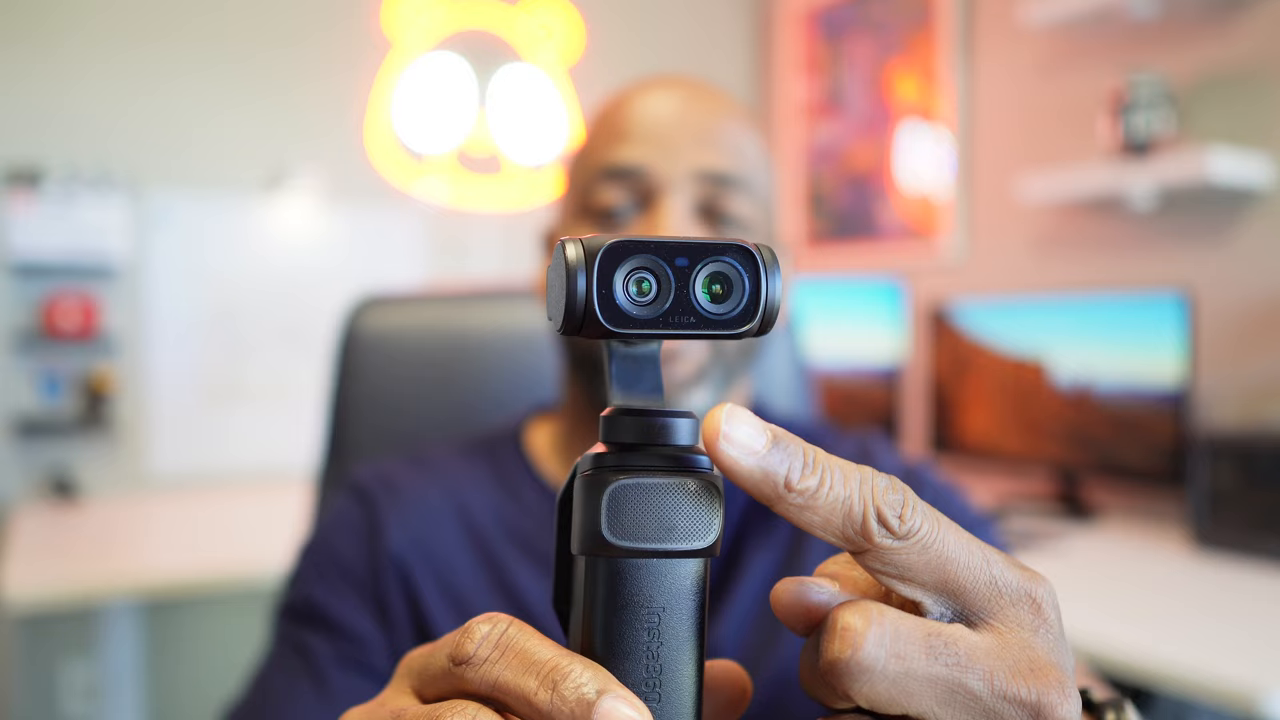
Here are the key imaging specifications:
- Wide-angle camera: A 1-inch 8K sensor, f/1.8 aperture, a stated 35 mm equivalent focal length, and 14 stops of dynamic range.
- Telephoto camera: A 1/1.3-inch sensor, f/2.0 aperture, and up to 6x lossless zoom.
- Digital zoom: Recently increased from 12x to 15x.
- Processing: Two Pro imaging chips and a dedicated AI processing chip.
Those three chips work together on the image processing, and I’ve been really happy with the results across different environments. More importantly, having both lenses gives me options when I’m out on a trail, traveling, or recording something I can’t physically get close to.
Telephoto Is Useful for More Than Distant Subjects
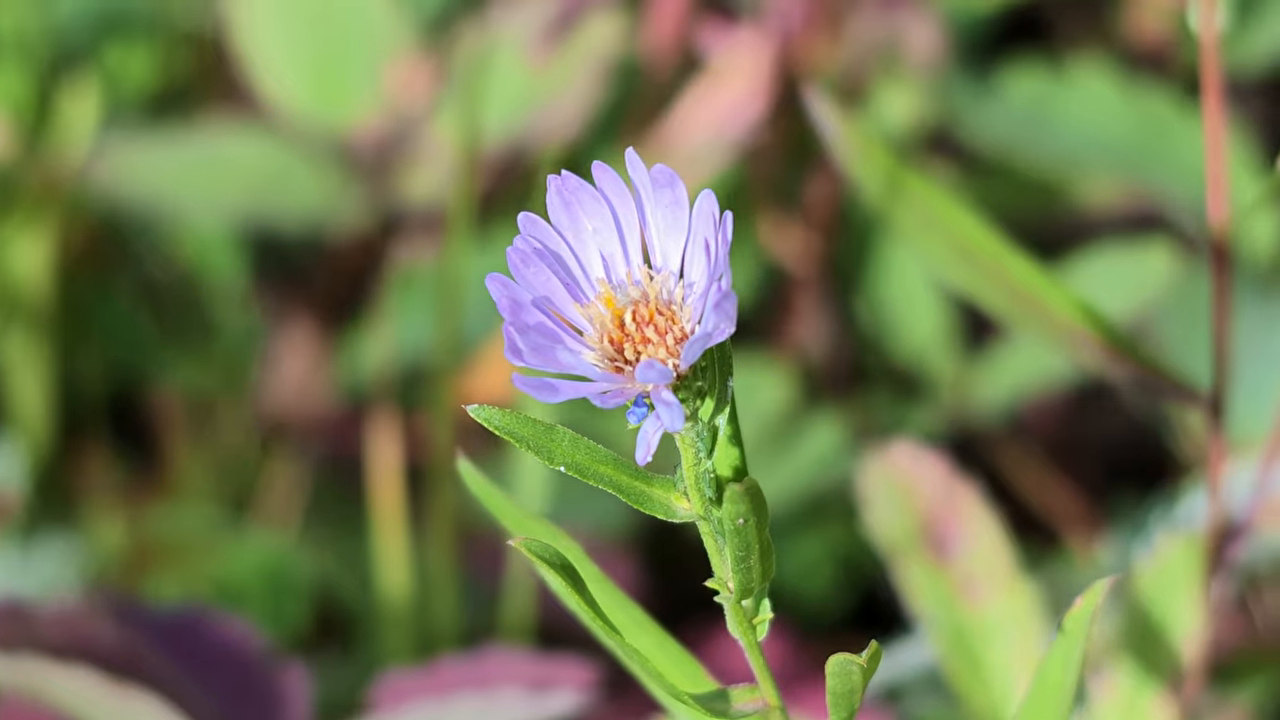
I expected to use the telephoto lens for things farther away. What surprised me was how well it worked for macro-style close-ups. On a hike, I used it to capture a tiny wildflower, and the result was surprisingly good.
I also used the zoom to bring ducks on a pond closer into the frame. That’s the kind of flexibility I appreciate: a wide view of the landscape, a tighter shot of wildlife, and a close-up of a flower, all with the same camera.
Just keep the zoom numbers straight. The 6x lossless zoom and the 15x maximum digital zoom are not the same thing. The lossless range is the one to focus on when preserving image quality is your priority.
Low-Light Performance and Stage Mode
The Luna Ultra does really well in low light. Its large 1-inch sensor, triple-chip processing, and PureVideo mode work together to produce footage I’m happy to use after the light starts fading.
There’s still a difference between low light and almost no light, though. While recording beneath an overpass, my face was heavily shadowed. The optional fill light, which attaches to the top of the camera, made a noticeable difference by lighting my face.
That accessory is a useful option if you expect to record yourself in very dark places. Good low-light processing is valuable, but sometimes you simply need to add light to your subject.
A Mode Built Around Concert Recording
I love going to concerts and recording my favorite songs, but getting both good video and good audio can be difficult. You’re often a long way from the stage, the surroundings are dark, and the lighting keeps changing.
Stage mode combines AI image processing with the telephoto lens to capture distant performers in low light. Active Zoom Tracking helps keep the subject framed, while Stage Audio provides a sound option for that environment. It’s a useful set of tools for a situation where an ordinary wide shot can leave the performers looking tiny.
Audio Matters Just as Much as Video
The Luna Ultra has four microphones: three on the gimbal and one on the detachable touchscreen remote. I’m really happy with the quality of its built-in audio, which is a big reason I like using it as a vlogging camera.
You have three main audio modes:
- Original Audio
- Auto Wind Reduction
- Voice Enhancement
Wind noise can ruin otherwise good footage. Out on a hike, that matters just as much as sharpness or color. The Luna Ultra’s built-in windguard works with Auto Wind Reduction to reduce that noise, and I’ve found that combination particularly useful outdoors.
Why I Still Like Using the Mic Pro
The internal microphones are good, but an external microphone gives you more flexibility. I’ve been using the Insta360 Mic Pro, and it’s an excellent option when getting clear audio is a priority.
You can connect two microphones if you have a guest with you. It also lets you move well away from the camera while keeping the microphone close to your voice. I tested it across an open field as the wind picked up, which is exactly the kind of situation where that flexibility becomes valuable.
This isn’t just about making polished creator content. Clear audio matters when you’re recording family moments, an interview, or anything where you want to hear the people involved.
A Mechanical Gimbal That Stabilizes and Tracks
The Luna Ultra uses a physical three-axis gimbal for stabilization, rather than relying on the electronic stabilization commonly used by action cameras. It does a good job keeping footage steady, but the gimbal also enables one of my favorite tools for solo filming: subject tracking.
To start tracking, press the joystick. The camera finds the subject and begins following it.
I’ve used tracking while walking, running, riding my bike, and even driving my Jeep. It has worked really well for me. If it loses me, it also does a good job picking me back up when I return.
For a solo creator, this does two useful things. It helps keep you in the frame, and it adds movement to a shot without needing someone behind the camera. Instead of every setup being a completely static composition, the camera can follow the action.
The Detachable Touchscreen Is My Favorite Feature
The 2-inch touchscreen rotates between vertical and horizontal orientations to suit the content you’re recording. That’s handy, but the part I love most is that the whole touchscreen control unit detaches and becomes a remote.
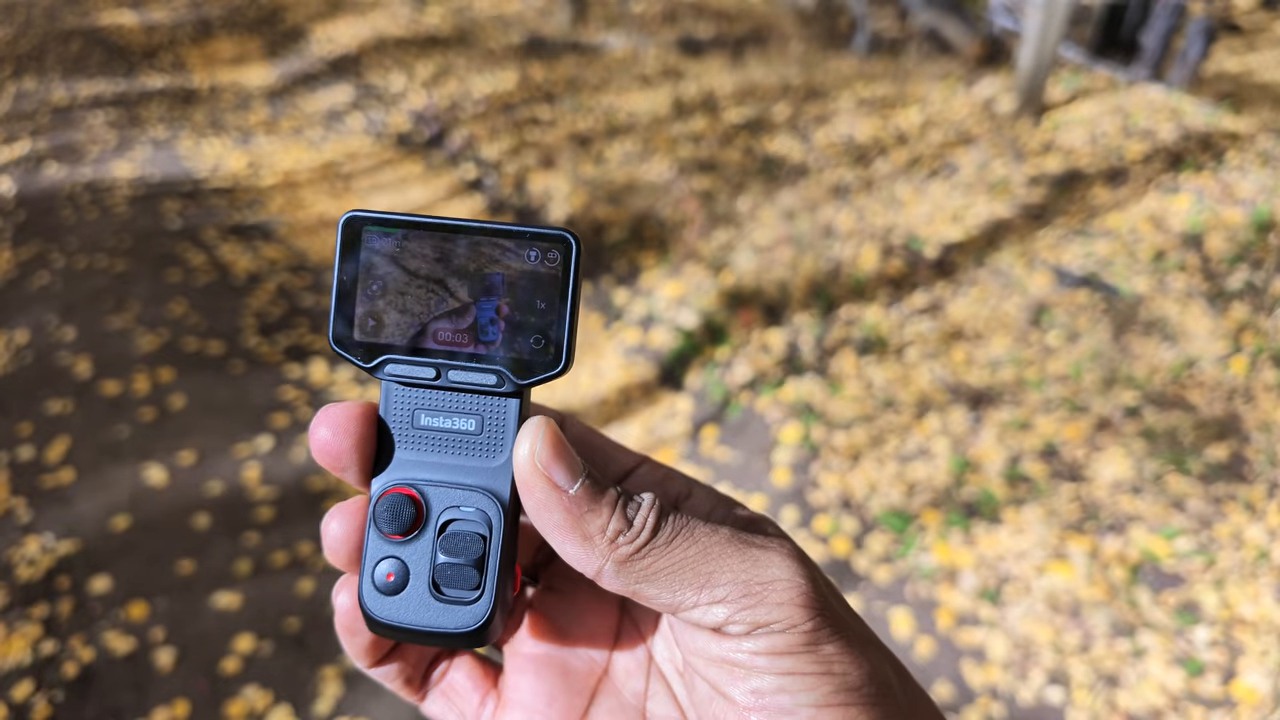
One of the hardest parts of filming yourself is setting up the camera, walking into position, and hoping the framing is right. With this remote, I can go where I want to stand and adjust the camera from there.
From the detached unit, I can:
- Check my framing.
- Pan the camera head left and right.
- Tilt the camera up and down.
- Change color settings and recording modes.
- Access the camera’s other controls without walking back to it.
The remote also has a microphone on top, so you can bring your audio pickup with you. Its stated range is 20 meters. During my outdoor test, I estimated that I was about 25 to 30 feet from the camera, rather than testing that maximum distance.
Being able to frame, control, and record from that far away is incredibly useful. For the way I work, this feature is even more exciting than the dual lenses.
360 Photos, Panoramas, and Creative Recording Modes
The Luna Ultra can take 360-degree photos, too. I tried this in the middle of an aspen grove during the fall color change, where there was something interesting in almost every direction.
The process is straightforward:
- Capture the 360 photo with the camera.
- Open the Insta360 app and select the image.
- Move around the image to choose your composition, including looking upward or down toward the ground.
- Export once you’ve found the framing you want.
It’s a fun way to choose a composition after capturing the scene. Beyond 360 photos, the camera also supports standard photos, panoramic photos, time-lapse recording, and TimeShift recording.
For slow motion, you can record 4K at up to 120 frames per second. Between those modes and the two lenses, there’s quite a bit of creative flexibility in this little setup.
Battery Life and Charging: My Actual Results
Battery claims are useful, but I wanted to know what the Luna Ultra would do with the settings I actually use.
First, I ran the battery completely down and tested charging. Insta360’s claim was approximately 80% in 23 minutes. My result was right in line with that:
- After 23 minutes: About 83% charged.
- Full charge: A little over 31 minutes.
That’s really good. A relatively short charging break can get a substantial amount of power back into the camera.
Insta360 also claims up to four hours of recording, but that uses more conservative settings than I normally choose. At 4K and 60 frames per second, I got just under two and a half hours. That’s the figure I would keep in mind if you record the way I do.
Handles That Add Practical Value
The included handle has small tripod legs tucked underneath it. That gives you a quick way to set the camera down without carrying a separate little tripod for every setup.
If you need more recording time, the optional battery handle adds 1,000 mAh of battery capacity. It also includes a quarter-inch mounting thread and built-in tripod legs.
47 GB of Internal Storage Is a Welcome Backup
This is a feature I’m really glad Insta360 included, and I’d love to see it on more of its cameras: 47 GB of internal storage.
The Luna Ultra still uses a microSD card, but internal storage gives you a backup when you forget the card, lose it, or fill it up. It’s not the flashiest feature, but it can make the difference between getting the shot and having no way to record it.
Accessories Worth Knowing About
There are several accessories that let you tailor the Luna Ultra to the way you shoot. Some are everyday tools for me; others are more specialized.
- Wide-angle lens attachment: One I use quite a bit when I want a broader view.
- Black mist filter: Adds a softer, more cinematic feel to footage.
- ND filter kit: Includes ND4, ND16, and ND64 filters.
- Fill light: Mounts above the camera and helps illuminate a nearby subject in dark surroundings.
- Protective carrying case: Protects the camera and provides space for a couple of lens accessories.
- Head tracker and neck mount: A specialized combination for POV recording.
The head tracker is one of the more unusual accessories. As I turn my head, the gimbal follows that direction. Paired with the neck mount, it lets the camera follow where I’m looking, which makes sense for POV content.
It’s pretty wild to use. Whether you need it depends on how much first-person filming you do.
Standard Bundle or Creator Bundle?
If the Luna Ultra fits your needs, the next decision is which bundle to get. Of the options discussed here, the Standard Bundle is the basic starting point. It includes:
- The Luna Ultra camera
- A protective case
- A handle
- A windguard
- A lanyard
My recommendation is the Creator Bundle. The main reasons are the wide-angle lens attachment, the Mic Pro, and the extended battery handle.
I think the wide-angle attachment is worth having, but the microphone is the biggest reason I favor that package. Audio is too important to overlook, and having a good external mic makes the setup more versatile. Add the extra battery capacity, and that combination covers most of what I need.
The Things I Wish Were Better
I highly recommend this camera, but there are a few limitations I would want to understand before spending the money.
No 4:3 Recording for Flexible Reframing
My biggest frustration is the lack of a 4:3 recording option. I like recording once and then adapting that footage for both horizontal and vertical content.
A taller 4:3 frame gives me more room to make those different crops. With the Luna Ultra’s current setup, I’m choosing horizontal or vertical when I record. I don’t want to repeat a moment just because I need one version for YouTube and another for TikTok.
If those formats are central to your workflow, think carefully about how you plan to frame your footage. Adobe’s guide to video aspect ratios offers useful background on how frame shapes affect delivery.
The Wide-Angle Attachment Has Trade-Offs
I like the wide-angle attachment and use it regularly, but I still wish its field of view were wider.
There’s also a practical issue: with the attachment installed, the camera can’t close into its normal folded position. It’s a small inconvenience, but one worth knowing about if you expect to leave that lens attached all the time.
It Is Not Waterproof or Built for Abuse
This is the most important distinction: the Luna Ultra is not an action camera, and it is not waterproof.
I use it outdoors, but that doesn’t mean it’s the right tool for water, dirt, drops, or rough treatment. If your priority is a camera you can take into the water or expose to a real beating, I would look toward something like the X6 or Ace Pro 2 instead.
Who Should Buy the Luna Ultra?
I think the Luna Ultra makes sense for a broad range of people, from casual users recording family moments to professional content creators. Its biggest strengths are the combination of image quality, lens flexibility, good audio options, mechanical stabilization, and controls that make solo filming easier.
For me, the detachable touchscreen is the feature that makes the whole camera more useful day to day. Add reliable tracking and the Mic Pro, and I can handle shots on my own that would otherwise take more setup or another person.
That’s why it now handles about 90% of my content. If your priorities line up with mine, it’s an easy camera to recommend. Just buy it for what it is: a versatile creator camera, not a waterproof, take-anywhere action camera.
If you decide it’s the right fit, using my affiliate link helps support my work. I may receive a commission from purchases made through it.
|